<aparte-chat-viewport style="height: 37rem"></aparte-chat-viewport>

<script>
  // In an app: import { setupWeatherCard } from '@aparte/plugin-cards/weather';
  const { setupWeatherCard } = window.apartePlugins.cards.weather;

  setupWeatherCard({ tool: 'get_weather' });

  const viewport = document.querySelector('aparte-chat-viewport');
  viewport.appendMessage({ id: 'u1', role: 'user', content: 'Weather in Lille?', timestamp: Date.now() });
  viewport.appendMessage({ id: 'a1', role: 'assistant', timestamp: Date.now(), segments: [{
    id: 's1', type: 'tool_call', status: 'resolved',
    toolCall: { id: 'c-s1', name: 'get_weather', input: { city: 'Lille' } },
    structuredResult: {
      location: 'Lille', condition: 'partly-cloudy', temperature: 11, feelsLike: 9, high: 14, low: 7,
      humidity: 78, wind: { speed: 18, direction: 240 }, precipitation: 40,
      hourly: [11, 12, 13, 14, 13, 12, 10, 9].map((temperature, i) => ({
        time: new Date((Math.floor(Date.now() / 3600000) + i) * 3600000), temperature,
        condition: i > 4 ? 'rain' : 'partly-cloudy', precipitation: i > 4 ? 60 : 10,
      })),
    },
  }] });
</script>
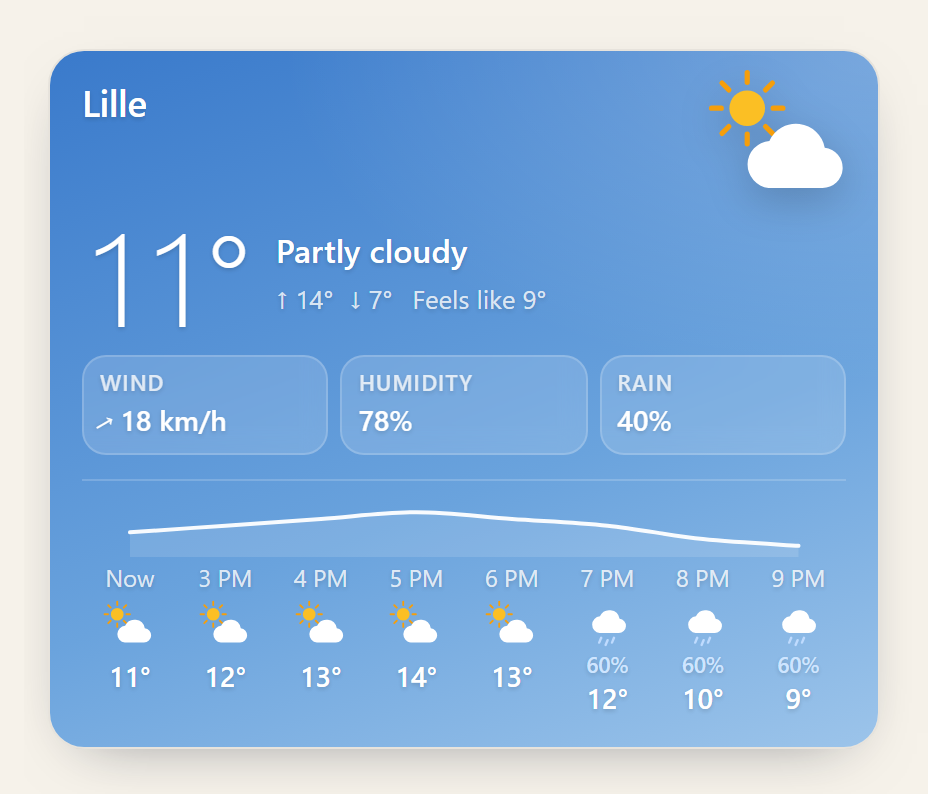
A tool that answers “what’s the weather” returns numbers; a person wants to see the sky. The card
draws it where the tool’s row would be: the condition on its own sky, the temperature, the day’s
range, the feel, wind, humidity and rain, then the next eight hours under the temperature’s curve.
Only temperature (or daily) is needed; every other field adds its line when it is there.
Variants
Section titled “Variants”Compact
Section titled “Compact”<aparte-chat-bubble message-id="a1" data-role="assistant" name="Assistant"></aparte-chat-bubble>
<script>
// In an app: import { setupWeatherCard } from '@aparte/plugin-cards/weather';
const { setupWeatherCard } = window.apartePlugins.cards.weather;
setupWeatherCard({ tool: 'get_weather', variant: 'compact' });
document.querySelector('aparte-chat-bubble').setSegments([{
id: 's1', type: 'tool_call', status: 'resolved',
toolCall: { id: 'c-s1', name: 'get_weather', input: { city: 'Paris' } },
structuredResult: { location: 'Paris', condition: 'clear', temperature: 6, high: 13, low: 4 },
}]);
</script>One line: the glyph, the temperature, the place and the sky, the range.
Forecast
Section titled “Forecast”<aparte-chat-bubble message-id="a1" data-role="assistant" name="Assistant"></aparte-chat-bubble>
<script>
// In an app: import { setupWeatherCard } from '@aparte/plugin-cards/weather';
const { setupWeatherCard } = window.apartePlugins.cards.weather;
setupWeatherCard({ tool: 'get_weather', variant: 'forecast' });
document.querySelector('aparte-chat-bubble').setSegments([{
id: 's1', type: 'tool_call', status: 'resolved',
toolCall: { id: 'c-s1', name: 'get_weather', input: { city: 'Tokyo', days: 7 } },
structuredResult: {
location: 'Tokyo', condition: 'rain', temperature: 17, high: 19, low: 13,
daily: [[19, 13, 'rain', 80], [22, 14, 'partly-cloudy', 10], [24, 16, 'clear', 0], [21, 15, 'cloudy', 20],
[18, 12, 'thunder', 70], [20, 13, 'drizzle', 40], [23, 15, 'clear', 0]]
.map(([high, low, condition, precipitation], i) => ({ date: new Date(Date.now() + i * 86400000), high, low, condition, precipitation })),
},
}]);
</script>The current weather on its sky, then the days ahead, each with its range on a scale shared by all of them, so a cold day reads as one at a glance.
At night
Section titled “At night”<aparte-chat-bubble message-id="a1" data-role="assistant" name="Assistant"></aparte-chat-bubble>
<script>
// In an app: import { setupWeatherCard } from '@aparte/plugin-cards/weather';
const { setupWeatherCard } = window.apartePlugins.cards.weather;
setupWeatherCard({ tool: 'get_weather' });
document.querySelector('aparte-chat-bubble').setSegments([{
id: 's1', type: 'tool_call', status: 'resolved',
toolCall: { id: 'c-s1', name: 'get_weather', input: { city: 'Oslo' } },
structuredResult: {
location: 'Oslo', condition: 'snow', night: true, temperature: -3, feelsLike: -8, high: -1, low: -6,
humidity: 88, wind: { speed: 12, direction: 20 }, precipitation: 70,
hourly: [-3, -3, -4, -4, -5, -5, -6, -6].map((temperature, i) => ({
time: new Date((Math.floor(Date.now() / 3600000) + i) * 3600000), temperature, condition: i < 5 ? 'snow' : 'cloudy', precipitation: i < 5 ? 70 : 20,
})),
},
}]);
</script>night: true draws the night sky and the moon. Each of the eleven conditions has a day sky and a
night sky, and its glyph moves gently unless the system asks for reduced motion.
While the call runs
Section titled “While the call runs”<aparte-chat-bubble message-id="a1" data-role="assistant" name="Assistant"></aparte-chat-bubble>
<script>
// In an app: import { setupWeatherCard } from '@aparte/plugin-cards/weather';
const { setupWeatherCard } = window.apartePlugins.cards.weather;
setupWeatherCard({ tool: 'get_weather' });
// The call is still running: the card draws its skeleton, with what the input already says.
document.querySelector('aparte-chat-bubble').setSegments([{
id: 's1', type: 'tool_call', status: 'pending',
toolCall: { id: 'c-s1', name: 'get_weather', input: { city: 'Lille' } },
}]);
</script>The skeleton shows what the call’s input already says: the city, before the forecast. A call that waits for approval, or was refused, is one line that says so, never a card (states).
npm install @aparte/plugin-cards @aparte/coreimport { setupWeatherCard } from '@aparte/plugin-cards/weather';
setupWeatherCard({
tool: 'get_weather',
map: (result) => ({ location: result.city, condition: result.sky, temperature: result.temp_c }),
variant: (data) => (data.daily.length > 2 ? 'forecast' : 'hero'),
});map turns your tool’s own fields into the card’s; fromOpenMeteo reads an Open-Meteo response
as it comes. The fields, the condition readers and the colours are in
the guide.
Related
Section titled “Related”- Cards guide — every card, buttons, live controls, a card of your own.
- Tool call — the row a card replaces.